Skip to content

Linga

By Sarah Wong

An AI-powered platform that translates video speech across languages in real time, all the while preserving voice, tone, and facial expression

Company: Pratt Institute Thesis

Role: End-to-end Designer

Tools: Figma, AI Speech

Date: 2025

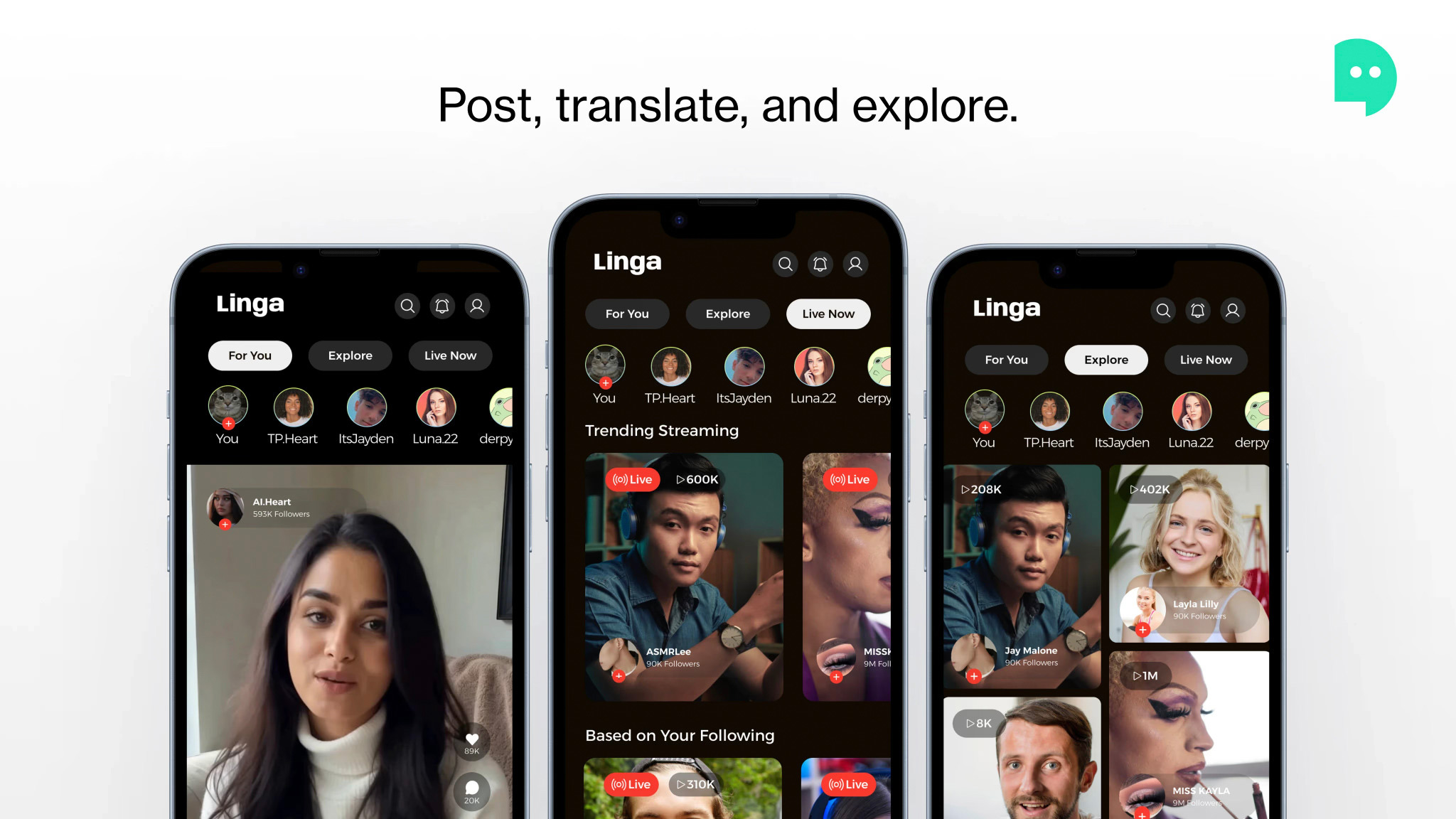
Three smartphones displaying the Linga app interface. The first screen shows a live video of a woman and follower count, the second features a trending streaming section with a male presenter and images of other creators, each with follower counts, while the third highlights content based on user following. The app emphasizes posting, translating, and exploring. The color scheme is dark with prominent buttons for navigation.

MISSION

What is Linga?

A social media app that instantly translates video speech into any language with realistic mouth sync, natural tone, and emotional expression — designed as a BFA thesis at Pratt exploring how AI can break language barriers and build more inclusive global communication.

PROBLEM + SOLUTION

The Opportunity

Most content exists in one language only. Subtitles break immersion and feel impersonal. Creators can’t efficiently reach global audiences. Families across languages struggle to share moments

A two-column graphic outlining a problem-solution scenario. On the left, "THE PROBLEM" lists four issues: content is often in one language, subtitles feel impersonal, creators struggle to reach global audiences, and families with language differences have difficulty sharing moments. On the right, "THE SOLUTION" presents four points: real-time AI speech translation, preservation of voice and tone, familiarity with social platform patterns, and seamless translation that remains invisible to the viewer.

COMPETITIVE ANALYSIS

Designing for familiarity

Linga was intentionally built on patterns users already know from TikTok and Instagram — lowering the barrier to adoption while layering in AI translation as a natural extension, not a disruptive new feature.

The image displays two smartphones side by side, showcasing user interfaces from TikTok and Instagram. On the left is a TikTok screen featuring a full-screen vertical video feed, navigation tabs, and icons for engagement options. The right side illustrates an Instagram interface, highlighting story rings, a follow button, exploration tab, and other navigation features. Each section is annotated with bullet points listing features borrowed from the respective platform.

PROCESS

User Flow

The app centers on three core paths from the main feed: exploring content, managing your profile, and creating a post — each with its own language-selection touchpoint.

A flowchart with a "Start" node at the top, leading to five options: "For You," "Explore," "Live Now," "Post," and "Profile." Below "Live Now," there is an arrow pointing to "Settings," which connects to "Choose Language," leading to "Continue Watching." The nodes are in purple shades, with directional arrows showing the flow from one option to the next.

LOFI WIREFRAMES

Sketching the structure

Before committing to visual style, the core screens were mapped in lo-fi — establishing layout, navigation patterns, and the language-selection flow.

A series of five mobile app interface screens with a dark background. The first screen features icons for home, cart, and settings. The second screen displays user profiles. The third screen shows a language selection menu with options including Chinese (Mandarin), Spanish, French, German, Japanese, Hindi, Portuguese, Russian, and Italian. The fourth screen has buttons for navigating through photo and text options. The fifth screen includes fields for writing with buttons for "Language," "Next," "Drafts," and "Post."

HIFI WIREFRAMES

The full screen spread

Three rows show the complete app across all primary flows — the main feed, explore, live streaming, profile, settings, and the language selector in action at multiple translation states.

A grid of smartphone screens displays an app interface called "Linga." Each screen shows various features including video calls with different individuals, trending streams, and options for language settings. Some screens feature images of cats. The interface includes sections for exploring content, managing settings, and selecting languages like English and Spanish. The design is dark-themed, emphasizing user interactions and content discovery.

DELIVERABLES

Final Screens

A smartphone displays the Linga app interface, showcasing a video of a woman with long brown hair and a white sweater. The app features a black background with various sections labeled "For You," "Explore," and "Live Now," along with user profile images. The Linga logo appears on the right, featuring a green chat bubble next to the text "Linga."
A smartphone displaying an app called "Linga." The screen features a dark background with sections labeled "For You," "Explore," and "Live Now." Various user profiles are shown, each with follower counts. The layout includes circular profile pictures at the top and several rectangular video thumbnails below, showcasing different users. The lower part of the screen features navigation icons, including a home icon, a plus sign, and a globe icon.
Four smartphones display a video chat interface from an app called "Linga." A woman with long, wavy red hair appears on the screen, engaging with viewers. The screens show various features, including user profiles, friends, and a language selection menu. One phone highlights language options like Spanish and Mandarin, and the interface has a dark background with colorful accents.
An informational graphic promoting a communication app. It includes three main sections: one for scanning a QR code to launch the app, another featuring a smartphone displaying video chat with users, and a third suggesting tapping an icon to select a language for translation. The top text states, "We made communication easy." The overall design is sleek, with bold, clear instructions and engaging visuals.
A close-up of a smartphone screen displaying two app icons. On the left, the "Linga" app features a purple background with a green speech bubble and the text "Linga" below it. On the right, the "Photos" app has a multi-colored flower icon with a white background and the text "Photos" below it. The time displayed at the top of the screen is 12:30.

MOTION DESIGN

Product launch trailor

Created as part of the thesis show to introduce Linga and communicate its vision, a product-quality video bringing the concept to life.